
CS2 Float Values and Wear Explained
Updated
A float value in Counter-Strike 2 is a permanent number between 0 and 1 that controls how worn a weapon skin or pair of gloves looks. In general, the closer that number sits to 0, the cleaner the finish appears, while numbers closer to 1 bring heavier scratching, duller tones, or grime. Every finish has its own allowed float window inside that 0 to 1 scale, and once an item is created, its float is locked in for good.
What a Float Value Actually Is
Whenever a skin enters the game through a case, weekly drop, redemption, or trade-up contract, its exact float value is assigned when the item is created (rolled randomly on drops and openings, or calculated from the inputs in a trade-up) and stays attached to it permanently. Playing thousands of matches with the gun, trading it across accounts, adding a name tag, or applying stickers will never move that number, and there is no way to repair or polish a worn skin into a cleaner one. Float is also purely cosmetic. A Battle-Scarred rifle fires with the exact same damage, spray pattern, and accuracy as a Factory New copy.
One detail that trips up newer players is treating float as a literal percentage of missing paint. A 0.25 float does not mean 25% of the artwork has flaked off. Instead, the float value feeds into the game's wear system alongside the finish style and weapon model to decide how strongly scratches, aging, and grime appear. The five exterior labels you see on the market simply group those decimal values into broad buckets, which is why two skins carrying the exact same Field-Tested label can look noticeably different in your hands.
CS2 Wear Conditions and Float Ranges
CS2 divides the full 0 to 1 scale into five exterior conditions. Each range includes its lower endpoint and stops just below the next threshold, with Battle-Scarred covering everything from 0.45 all the way up to 1.00.
| Wear Condition | Short Label | Exact Float Range | Typical Look |
|---|---|---|---|
| Factory New | FN | 0.00 ≤ float < 0.07 | Cleanest tier, though minor edge marks can still appear |
| Minimal Wear | MW | 0.07 ≤ float < 0.15 | Light scuffing on exposed corners and edges |
| Field-Tested | FT | 0.15 ≤ float < 0.38 | Wide range from nearly clean to clearly scratched |
| Well-Worn | WW | 0.38 ≤ float < 0.45 | Noticeable paint loss, dulling, or heavier edge wear |
| Battle-Scarred | BS | 0.45 ≤ float ≤ 1.00 | Heaviest abrasion, darkening, or exposed base metal |
Pay close attention to those exact cutoffs when looking at borderline items. Because interfaces often round floats to two decimal places, a listing displayed as "0.07" can hide the difference between 0.06999 (Factory New) and 0.07001 (Minimal Wear). Visually, those two copies will look virtually identical, yet the condition label and market tier change right at 0.07.
How Wear Progresses Across All Five Conditions
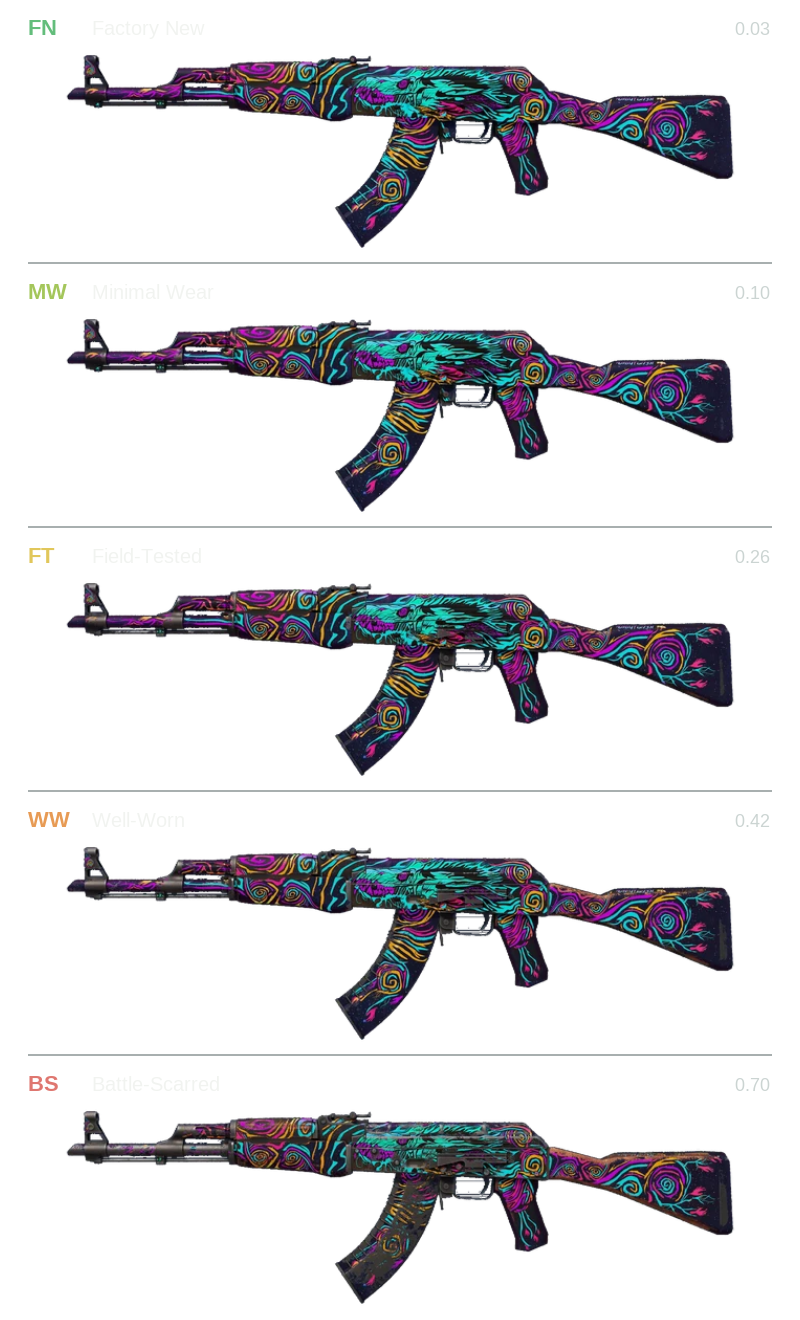
Let’s take AK-47 Nightwish as an example to see how its appearance changes across all five wear conditions. The five AK-47 | Nightwish captures below step through the full range at 0.03 (Factory New), 0.10 (Minimal Wear), 0.26 (Field-Tested), 0.42 (Well-Worn), and 0.70 (Battle-Scarred).
At 0.03 and 0.10, the neon artwork stays bright and intact, with wear mostly starting as subtle blemishes along edges and raised metal sections. By 0.26 in Field-Tested, abrasion becomes easier to spot across the body, though the overall design still reads cleanly. Moving into 0.42 Well-Worn and 0.70 Battle-Scarred strips back much more of the finish, exposing larger patches of the dark rifle underneath while leaving more durable parts of the graphic visible longer.
Keep in mind that wear does not advance at one flat pace across every number, and wear marks do not land in identical spots on every copy. Because Field-Tested stretches from 0.15 to just under 0.38, a 0.16 copy often looks close to Minimal Wear, while a 0.36 copy sits right next to Well-Worn. Even two skins with matching floats can place scratches slightly differently.
Capped Float Ranges
Not every skin in CS2 can roll across the full 0.00 to 1.00 range. Many finishes ship with a capped minimum float, maximum float, or both, which locks certain wear conditions out completely or shrinks a condition into a tiny sliver of the scale.
| Example skin | Allowed Float Range | Available Conditions |
|---|---|---|
| AWP | Asiimov | 0.18 – 1.00 | FT, WW, BS |
| AK-47 | Redline | 0.10 – 0.70 | MW, FT, WW, BS |
| Glock-18 | Fade | 0.00 – 0.08 | FN, MW |
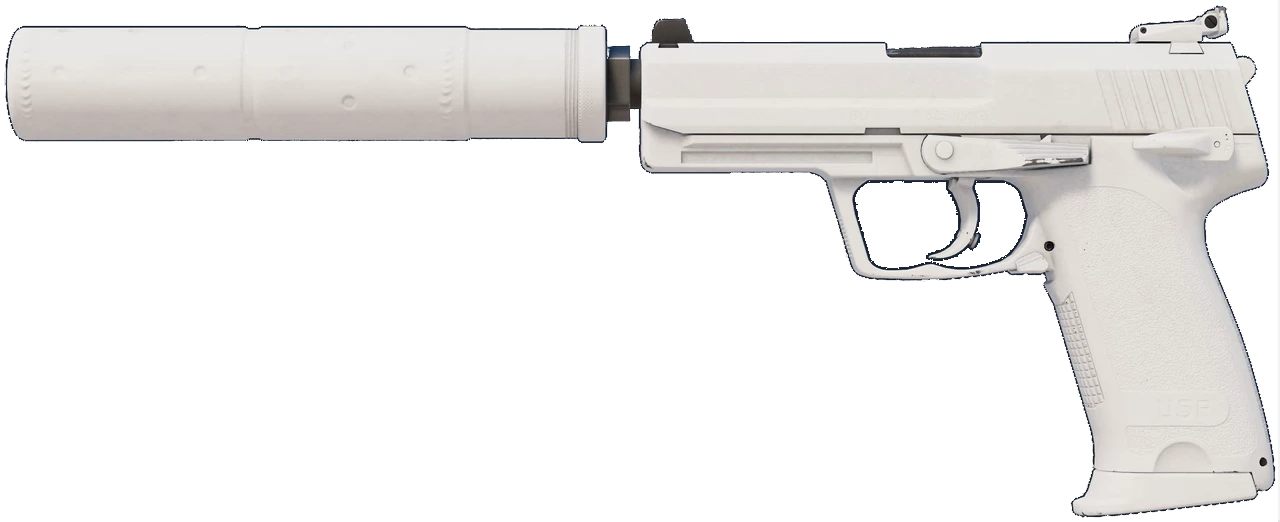
| USP-S | Whiteout | 0.06 – 0.80 | FN, MW, FT, WW, BS (FN only 0.06 to < 0.07) |
| AK-47 | Nightwish | 0.00 – 1.00 | FN, MW, FT, WW, BS |
Those caps explain why you will never find a Factory New AWP | Asiimov or AK-47 | Redline, and why a Battle-Scarred Glock-18 | Fade does not exist. They can also narrow a condition down to a tiny sliver of the scale: the USP-S | Whiteout is technically available in all five conditions, yet its 0.06 minimum cap squeezes Factory New into a 0.01 window between 0.06 and just under 0.07, compared with a full-range 0.00 to 1.00 finish like the AK-47 | Nightwish.
Why Wear Ranges Are Not Drop Odds
A common mistake is reading the wear table as a probability chart. Just because Factory New covers 7% of the 0 to 1 scale does not mean every skin has a 7% chance of dropping Factory New. A finish's float cap changes which exteriors are even possible, and how CS2 distributes floats when items generate does not treat the entire 0 to 1 bar as a flat, universal drop-rate split. If you want the official container probabilities for rarity tiers and StatTrak rolls, see our CS2 odds guide.

How Finish Style Changes What Wear Looks Like
Two skins with the exact same float value can look like they belong in different worlds depending on their finish style and durability masks. Painted finishes tend to chip away and lose parts of their artwork, exposing the bare material underneath. Patinated finishes age with darker tones and grime in crevices, and they can also scratch through to the base metal underneath rather than staying completely scratch-free. Depending on the finish, wear can show up as heavy edge chipping, overall dulling, grime buildup, or a mix of all three. Even a Factory New skin can still show light initial abrasion on sharp corners or raised parts.
Float only governs wear. It never changes a Doppler knife's phase, a Fade skin's color coverage, or a weapon's pattern seed. Map lighting also affects how bright, muted, or scuffed a surface appears while you play, even though the skin's underlying float never moves. For a full look at how surface materials and textures behave, read our CS2 finish styles guide and CS2 patterns guide.
How to Check a Skin's Exact Float
You can check the exact float of any skin directly inside Counter-Strike 2. Open the item in the in-game inspect screen and hover your cursor over the small info icon at the bottom. Look for the line labeled Wear Rating, which shows the skin's exact decimal float. Right beside it you will see Pattern Template, which is the pattern seed rather than wear.
Checking the actual number matters far more than relying on the exterior label alone, especially when a listing sits near a tier boundary like 0.07, 0.15, or 0.38. Before buying, take a quick look at the model itself in inspect mode too. High-visibility areas like rifle magazines, sniper scopes, pistol slides, and knife corners can look very different between two copies with nearly identical floats.
How Float Affects Value
Within any given skin's market, lower floats usually command higher prices because cleaner copies look sharper and tend to be scarcer. Even so, the lowest float you can find is not automatically the best buy for playing. On many finishes, a clean Field-Tested or Minimal Wear copy looks very close to Factory New while sitting in a completely different price bracket, so comparing the specific skin's wear progression is always more useful than chasing one universal target float.
Several float traits drive extra collector interest beyond ordinary cleanliness. Narrow float caps squeeze supply sharply, as seen with the tiny 0.06 to under 0.07 Factory New window on the USP-S | Whiteout. Extreme-float collectors also hunt both ends of the scale, looking for ultra-low floats close to a skin's minimum cap or ultra-high floats near its maximum.
The best-known high-float example is the AWP | Asiimov. At very high Battle-Scarred floats, roughly around 0.95 and above, the paint wears off the scope enough to leave it mostly or fully black. Players commonly call these "Blackiimovs." It is a visual wear effect rather than a separate finish or an official game cutoff, so inspecting the scope directly matters more than trusting a single float number.
How Float Works in Trade-Up Contracts
Trade-up contracts consume your input skins to generate a brand-new item with its own permanent float; they never repair or lower the float of a skin you already own. Where that new item's float lands depends on both the floats of the skins you put in and the allowed float ranges of those inputs and the possible output finishes.
Because every output skin has its own minimum and maximum float cap, feeding in low raw floats does not guarantee a Factory New result across every possible outcome. A finish with a 0.10 or 0.18 minimum cap can never come out Factory New no matter how clean your inputs are. To test specific recipes and check eligible outcomes before locking anything in, use our CS2 trade-up simulator.
Common Questions
Do CS2 gloves wear out as you play?
No. Gloves use the exact same permanent float system as weapon skins. Their float value is locked the moment they are created, so playing matches will never add scuffing or worsen their condition.
Do Vanilla knives have five wear conditions?
No. Vanilla knives do not come in the five exterior tiers from Factory New to Battle-Scarred, and they do not have a painted finish that wears across those conditions.
Is sticker wear tied to the weapon's float value?
No. Sticker wear is completely separate from the gun's float. Applying a fresh sticker onto a Battle-Scarred rifle leaves the sticker clean and intact, and scraping a sticker only wears down that sticker without touching the weapon's float.
Does a StatTrak kill counter change a skin's float?
No. Adding kills to a StatTrak counter only updates the number displayed on the weapon and has no effect on its float value or visual wear.